
Managing duplicate contracts
Why are duplicates allowed?
Legal firms often need to review the same property document for different clients. Common scenarios include:
- Multiple buyers interested in the same property
- Follow-up reviews with updated documentation
How does duplicate detection work?
Curia uses two layers of duplicate detection to help prevent duplicated work:
1\. Exact file matching (at upload)
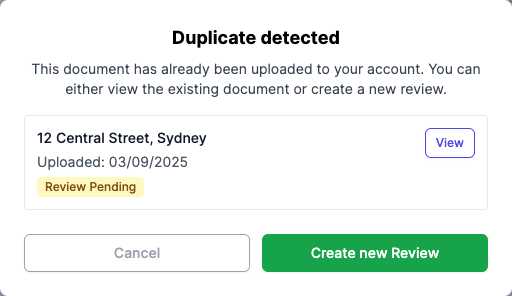
When you upload a document, Curia automatically checks if the identical file already exists in your account. If a match is found, you'll see a pop-up showing your existing reviews for that property. This detection catches files that are exactly byte-for-byte identical - if the document has changed in any way (more/less pages, compressed, additional text) then it will not be detected at this stage.
2\. Address matching (on Preflight tab)
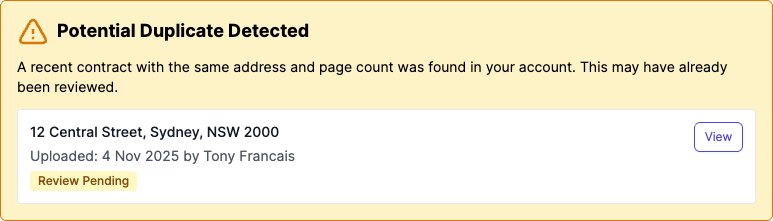
After the document is processed, Curia checks for other contracts with the same property address and page count uploaded in the last 3 months. This catches potential duplicates even when the files differ - for example, if the same contract was received from different sources or saved in different formats. If a potential match is found, you'll see a warning on the Preflight tab before you start the review.
How does the Preflight duplicate check work?
If you upload a file that is identical to one already in your account, a pop-up will appear showing:
- The filename of the existing document
- When it was uploaded
- The current review status (Review Closed or Review Pending)
You'll have three options:
- View - Opens the existing document in a new tab so you can check it
- Create new Review - Creates a new review for the same property (useful when reviewing the same property for different clients)
- Cancel - Cancels the upload and returns you to the upload form
How does the Preflight warning work?
When you open a contract on the Preflight tab, Curia checks if another contract with the same address and page count was uploaded to your account in the last 3 months. If a potential duplicate is found, a warning banner appears showing:
- The filename of the potential duplicate
- When it was uploaded and by whom
- Whether the review is complete or still pending
You can click "View" to open the potential duplicate in a new tab and check if it's the same property. This warning only appears during preflight - once you start the review, it will no longer be shown.
Note: This matching uses the property address extracted from the contract, so it can identify duplicates even when the files are different (such as compressed versions or documents received from different sources).
##
##
How do I check for existing reviews?
You can manually search for existing reviews before uploading:
- Navigate to the Reviews page.
- Use the search function to enter the property address.
- Review the search results to identify any existing documents for the same property.
- Determine whether a new review is needed or if an existing review meets your requirements.
Note: The system will also automatically check for duplicates when you upload a document and again on the Preflight tab after processing.
FAQ
What happens if I upload the same file twice?
Curia detects exact file matches and shows a pop-up with options to view the existing document, create a new review, or cancel the upload.
How does Curia detect duplicates at the address level?
After processing, Curia compares property addresses and page counts from contracts uploaded in the last 3 months. If a match is found, a warning appears on the Preflight tab.
Can I have multiple Reviews for the same property?
Yes. If you need to Review the same property for different clients, click "Create new Review" when the duplicate detection pop-up appears.
Will I be charged twice if I upload a duplicate?
Yes. If you proceed with a duplicate upload by clicking "Create new Review", you will be charged separately for both Reviews. Each Review incurs its own Preflight and Review fees.
Why doesn't Curia check the address before upload?
Curia needs to process the document to extract the property address, so address matching isn't available until after upload. At upload time, Curia checks for exact file matches instead. You can also manually search for existing Reviews by address before uploading.