
Subscription plans and billing
What payment options are available?
Curia offers two payment options:
- Pay As You Go (PAYG): Pay only for what you use with no upfront commitment
- Subscription plans: Pre-pay for credits and receive bonus credits
For detailed information about available plans and pricing, visit [curia.com.au/pricing
](https://www.curia.com.au/pricing)
How do I view my current plan?
To view your current plan details:
- Navigate to Settings
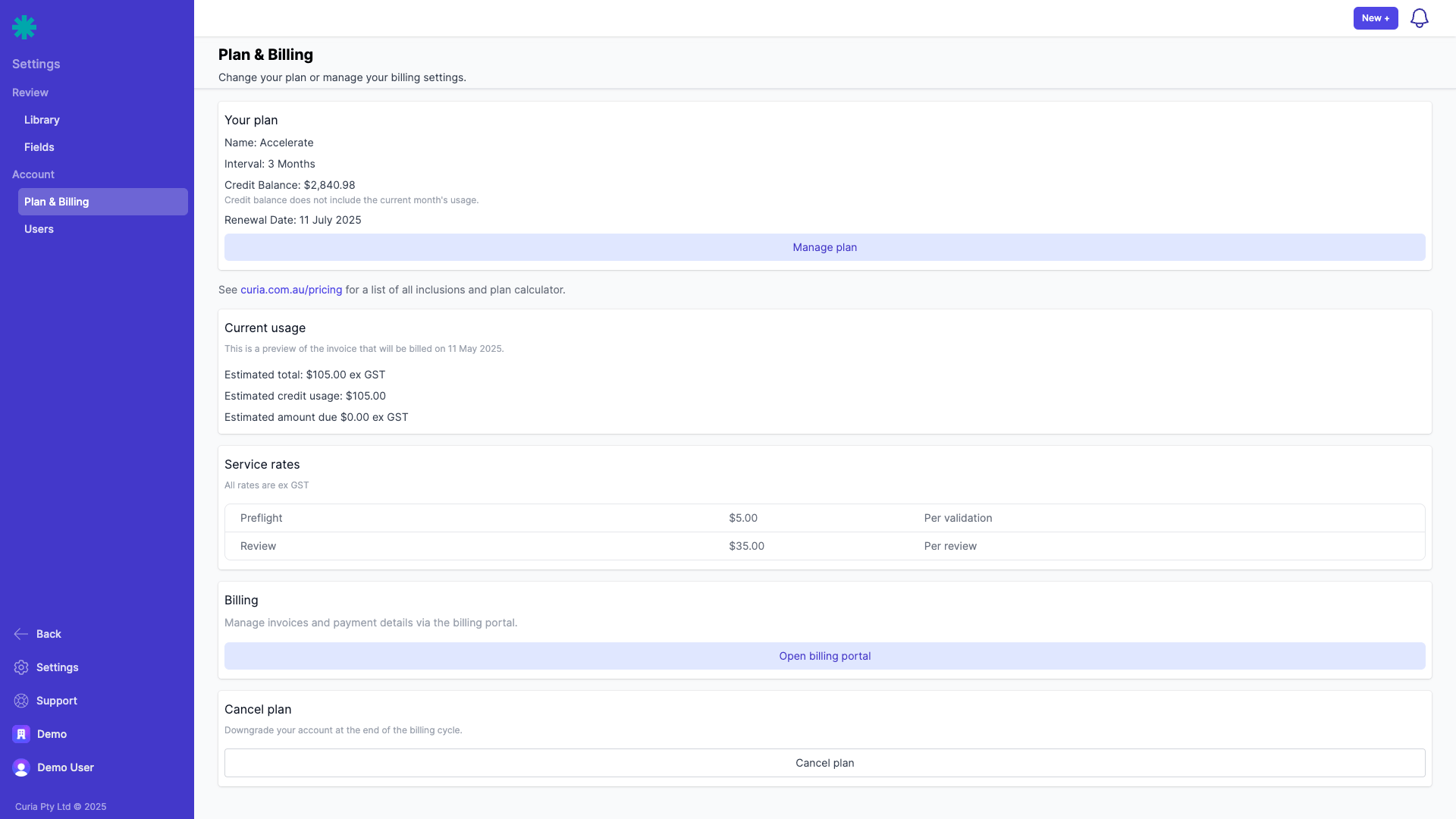
- Select "Plan & Billing" from the Account section (only available to users with the "Account Owner" role)
- Your current plan details appear at the top of the page (only visible for accounts on a subscription plan)
The plan overview shows:
- Billing interval (quarterly or yearly)
- Renewal date
- Current usage estimates
How do I view my credit balance?
Your credit balance is displayed in a dedicated "Credit Balance" card on the Plan & Billing page when you have credits available. This applies to:
- Accounts with active subscription plans
- Pay As You Go (PAYG) accounts with remaining credits
- Accounts with credits from previous subscriptions
The credit balance card shows:
- Your current available credit amount
- A note about how and when credits are applied
The credit balance card only appears when you have a positive credit balance. The balance does not include the current month's usage
How do credits work?
Credits apply against service rates as you use Curia, regardless of your account type:
- Credits are automatically deducted at the end of each month for that month's usage
- Each service (Preflight, Review, Amendment Tracking) deducts a specific amount
- The "Current usage" panel shows the estimated usage for the current month
- Unused credits roll over as long as your subscription remains active
- Credits expire 12 months after the end of the subscription period in which they were granted

How are invoices managed?
To manage invoices and payment details:
- Navigate to Settings > Plan & Billing
- Scroll down to the Billing section
- Click "Open billing portal" to access your invoices

In the billing portal you can:
- View past invoices
- Update payment methods
- Download invoice PDFs
Note that in the Billing Portal, you will see one subscription for your standard monthly plan. This subscription cannot be changed directly in the portal. To modify your credit plan, use the "Update subscription" option in Curia.

How do I subscribe to a plan?
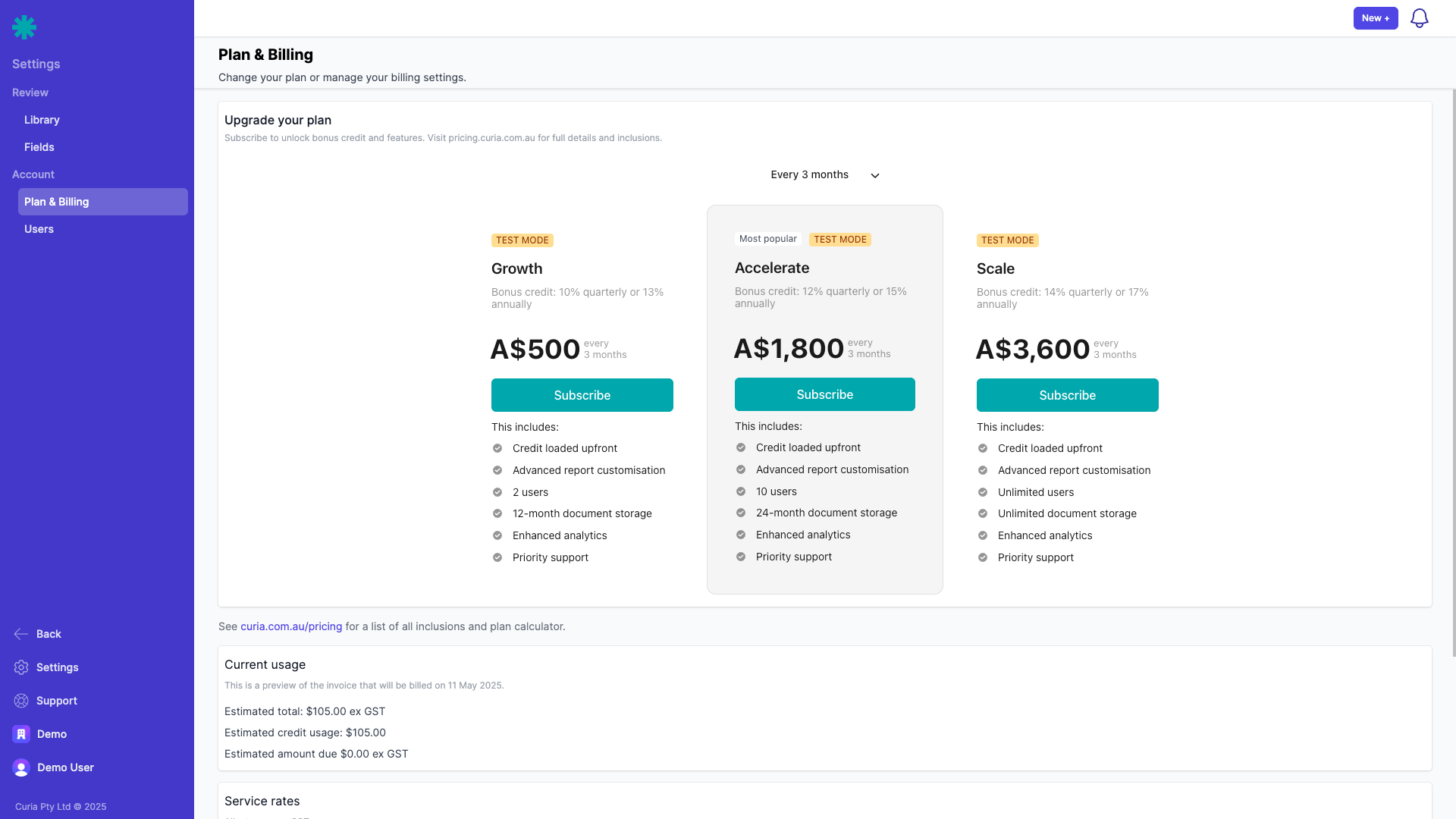
If you don't have a credit subscription yet:
- Navigate to Settings > Plan & Billing
- View the pricing table displaying available plans
- Choose your preferred billing cycle (quarterly or yearly)
- Select your desired plan and click "Subscribe"
- Follow the prompts to enter your payment information and complete the subscription process
How do I change my existing plan?
If you already have a credit subscription:
- Navigate to Settings > Plan & Billing
- Click "Open billing portal"
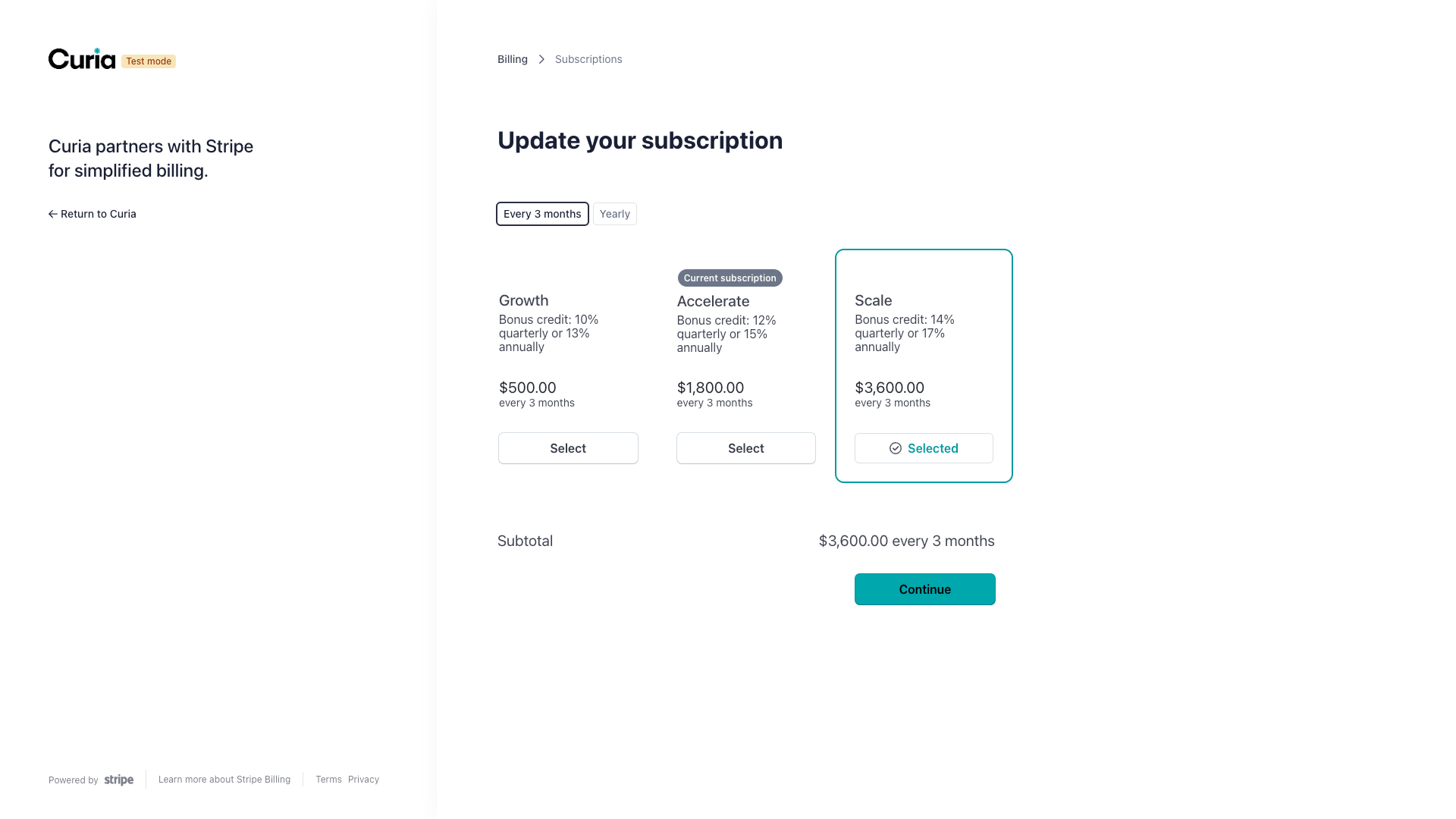
- Select "Update subscription" in the billing portal
- Choose your preferred billing cycle (quarterly or yearly)
- Select your desired plan
- Follow the prompts to complete the change
When upgrading your plan:
- Charges are calculated at a pro-rated rate for the remainder of your billing period
- Additional credits are added to your balance immediately
- Bonus credits are also pro-rated based on the remaining time in your billing period
When downgrading your plan:
- Changes take effect at the end of your current billing cycle
- Existing credits remain available until they expire
How do I cancel my subscription?
To cancel your subscription:
- Click the 'Cancel plan' button at the bottom of the Plan & Billing page, which starts an email to our support team
- Alternatively, send a support ticket requesting cancellation
- Include your account name and the email address associated with your account
After cancellation:
- Any remaining credits stay available for 12 months from the end of your subscription period
- Once your credits expire or are used up, your account converts to PAYG billing
- You can reactivate a subscription plan at any time
FAQ
Do I need a subscription to use Curia?
No. All accounts use Pay As You Go (PAYG) billing by default. Credit subscription plans are optional and allow you to prepurchase credit at a discounted rate.
What credit subscription plans are available?
Available credit subscription plans and pricing are displayed on the Settings > Plan & Billing page.
How do I upgrade or change my credit subscription plan?
Navigate to Settings > Plan & Billing. If you have an existing credit subscription, click "Open billing portal" and select "Update subscription" to change your plan.
What happens if I exceed my credit balance?
There are no notifications when credits are exhausted. Once your credit balance reaches zero, usage is charged at the standard Pay As You Go rates.
How do I cancel my credit subscription?
Navigate to Settings > Plan & Billing and click "Cancel plan". Cancellation takes effect at the end of your current billing cycle, and any remaining credits stay available for 12 months.